MOAC (Multi Org Access Control)
Using MOAC , we can access multiple operating unit without switch any responsibility. This feature in R12 to allow the users to submit requests and access the data of multiple operating units from a single responsibility. This can be achieved by setting the security profile in HRMS.
There are two types of Security Profile -
1. Security Profile (Local) - This is used for the selection of operating unit from the same Business Group.
2. Global Security Profile (Global) - This is used for the selection of operating units from the different business group. Here we do not have option to specify Business Group.
| STEPS TO
EXECUTE MOAC : |
1.
Define Security Profile in HRMS.
|
4. Assign Profile Option - 'MO:Security Profile' at responsibility level.
1. SECURITY PROFILE - The security profile will access single business group information. Define the security profile in HRMS responsibility.
Navigation - HRMS >> Security >> Profile


Click on save (Ctrl + s)
Run the Security List Maintenance Program -
Navigation - HRMS>> View>> Request >> Submit a New Request >> Single Request

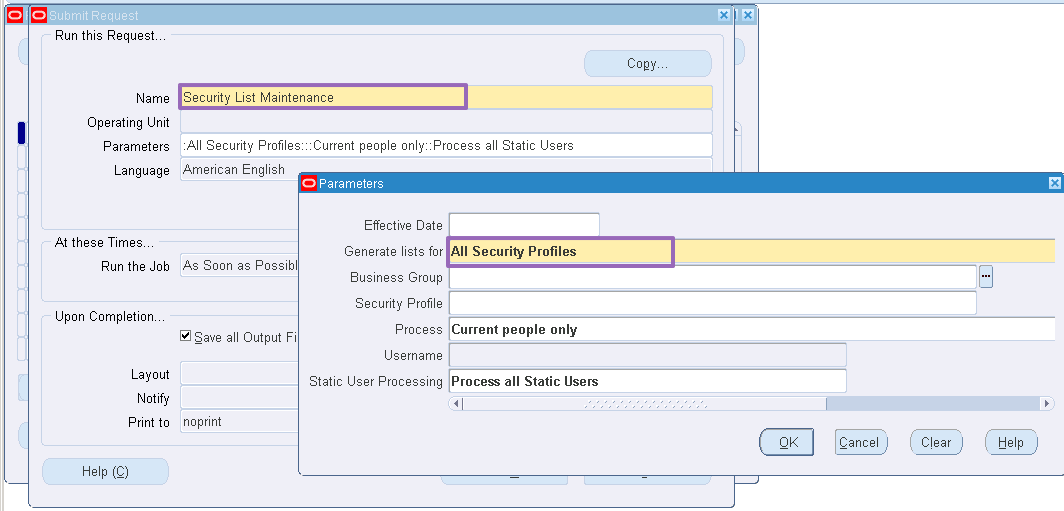
Click OK and then Submit
2. Global Security Profile - The global security profile will access more than one Business Group information.
Navigation - HRMS >> Security >> Global Profile


Click on Save (Ctrl + s)
Run the Security List Maintenance Program -
Navigation - HRMS>> View>> Request >> Submit a New Request >> Single Request

Click OK and then Submit.
Assign the Security Profile to the Responsibility -
Navigation - System Administrator >> Profile >> System

Click on Find

Save (Ctrl + S)
Comments
Post a Comment